• Skip to primary navigation
  • Skip to main content
  • Skip to primary sidebar
technzee logo

Technzee

reaking Down the Machines That Power Computing

  • Home
  • Blog
  • Terms
    • Privacy
    • Disclaimer
  • Support
  • Subscribe
  • Contact
  • Show Search
Hide Search

Laptops Lenovo laptops

Can You Use a Primebook Laptop for MCA DSC Filing?

September 24, 2025 by Rajeev Bagra

Every company in India has to stay compliant with the Ministry of Corporate Affairs (MCA) by filing annual returns, financial statements, and other statutory documents. These filings require authentication through a Digital Signature Certificate (DSC).

If you own a Primebook laptop and are wondering whether you can complete your yearly MCA compliance on it, here’s what you need to know.


What You Need for MCA DSC Filing

To sign and upload MCA forms digitally, you must have:

  • A valid DSC USB Token issued by a Certifying Authority like eMudhra, Sify, or Capricorn.

  • DSC Token Drivers, provided by the vendor.

  • Java Runtime Environment (JRE), since MCA’s signing process relies on Java.

  • A compatible browser (Internet Explorer for legacy forms, or Chrome/Edge with emSigner for newer ones).

  • The emSigner Utility installed and running in the background.


The Primebook Limitation

Here’s the catch:

  • Primebook runs on PrimeOS, which is based on Android, not Windows or macOS.

  • MCA utilities like Java, emSigner, and token drivers are only available for Windows and macOS.

  • That means you cannot directly use a Primebook laptop to digitally sign MCA forms.


Workarounds and Alternatives

If you’re using a Primebook, here are your options:

  1. Use a Windows or Mac System
    The most straightforward solution. Install the DSC drivers, Java, and emSigner, and file your forms without issues.

  2. Dual Boot with Windows (if supported)
    Some Primebook models may support dual boot with Windows. If so, you can install Windows alongside PrimeOS and switch when you need MCA filing.

  3. Use Another System Temporarily
    Borrow or rent a Windows/Mac computer just for MCA filing.

  4. Hire a Professional
    Chartered Accountants (CAs) and Company Secretaries (CS) routinely handle MCA compliance. You can provide your DSC and have them file on your behalf.


Conclusion

While the Primebook is great for everyday productivity and learning, it’s not suited for MCA DSC filing because the required utilities don’t support PrimeOS. To stay compliant, you’ll need to switch to a Windows or Mac device for signing and uploading MCA forms.

👉 If you run a company, make sure you arrange access to such a system well in advance of your filing deadlines to avoid last-minute stress.

Here’s an updated version of your blog with a new “Recommended Devices” section. You can plug this in toward the end of your post (just before conclusion).


Recommended Devices for Seamless MCA DSC Filing

To ensure your MCA annual compliance and DSC signing go smoothly, here are a few Dell and Lenovo Windows-based devices that are well suited for this work. These machines support all required software (Java, emSigner, token drivers) and offer the stability and ports needed for digital signatures.

Note: These are suggestions. Always verify compatibility with your DSC token vendor and check driver support for your region.

✅ Dell Options (Laptops & Desktops)

Here are some Dell devices you can consider:

  • Dell Inspiron 5430 — A compact 14″ laptop with Intel Core i5-1335U, SSD, and Windows 11. Good for portability plus power for MCA filing tasks.

  • Dell Inspiron 15 3530 — Slightly larger 15.6″ screen, decent all-rounder for daily use and compliance work.

  • Dell Vostro 3710 — A business-oriented laptop with Windows 11, ideal for small companies or professionals.

  • Dell Vostro 16 5630 — A 16″ variant that gives more screen real estate — useful if you often work with multiple document windows.

Dell also has good business-line models like the Latitude series and OptiPlex desktops. You can check them out on Dell India’s official site. (Dell)


🖥️ Lenovo Options (Desktops / All-in-Ones / Tower PCs)

For those who prefer a desktop or all-in-one setup, Lenovo has solid offerings:

  • Lenovo IdeaCentre Tower (14ᵗʰ Gen) — A tower desktop with full upgradability (RAM, storage) and Windows ready for compliance tasks.

  • Lenovo ThinkCentre Neo 50a AIO — All-in-One form factor (screen + PC in one), reducing cable clutter.

  • Lenovo ThinkCentre M75q Gen 5 — A compact mini desktop (small footprint) that still packs performance.

Lenovo’s ThinkCentre lineup is designed for business use and tends to offer reliable support and long product life. (Lenovo)


🧭 What to Look for When Choosing

When selecting a device for DSC filing and MCA compliance, keep these in mind:

Feature Recommended Spec
Processor (CPU) Modern Intel Core i3/i5 or AMD Ryzen 3/5 or better
RAM Minimum 8 GB (16 GB preferred)
Storage SSD (256 GB or more) for speed and reliability
Operating System Windows 10 or Windows 11 (64-bit)
Ports At least one USB-A port (for DSC token), plus extra ports for peripherals
Support & Drivers The manufacturer should provide driver updates and support for your region
Expansion / Upgradability Easy access to add more RAM, storage, etc.

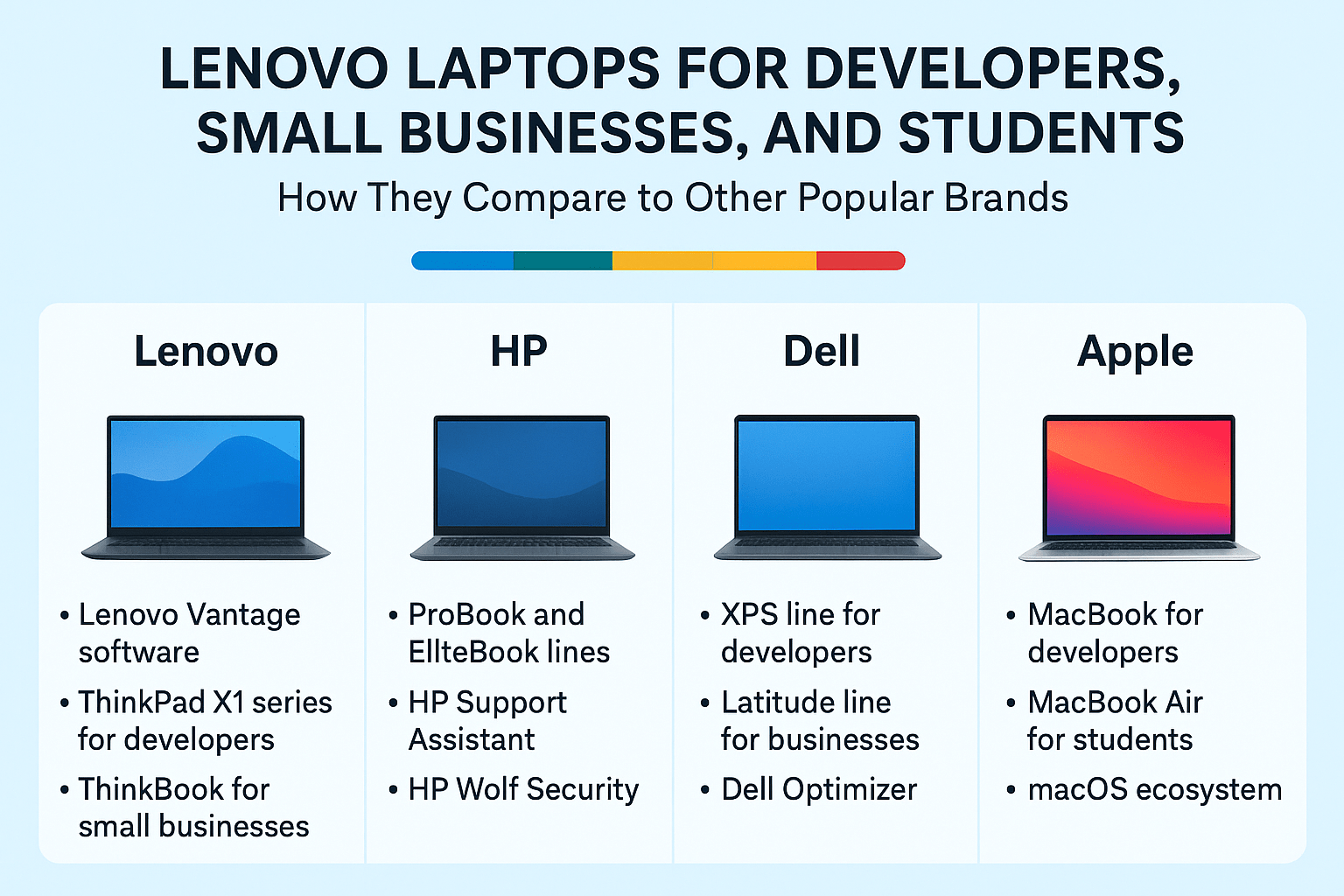
Lenovo Laptops for Developers, Small Businesses, and Students: How They Compare to Other Brands

August 24, 2025 by Rajeev Bagra

When shopping for a laptop as a developer, small business owner, or student, the options can feel overwhelming. Lenovo, Dell, HP, and Apple dominate the landscape, each with its own approach to balancing performance, reliability, and software ecosystem. In this post, we’ll explore what makes Lenovo unique—and where it stands compared to other popular brands.


Lenovo’s Unique Edge

1. Lenovo Vantage Software

Unlike many manufacturers that pack in bloated software, Lenovo offers Lenovo Vantage, a genuinely useful pre-installed app.

  • What it does: Manages system updates, diagnostics, battery health, camera/microphone settings, and even offers Wi-Fi security checks.

  • For small businesses: It can scale up with enterprise features like fleet device provisioning and predictive maintenance.

  • For developers/students: It ensures drivers, BIOS, and firmware stay current without manual intervention.

👉 Comparison: Dell has Dell Optimizer, and HP provides HP Support Assistant. Apple, on the other hand, integrates these controls invisibly into macOS—more seamless, but less customizable.


2. Hardware Lines Tailored to Each Audience

  • ThinkBook (Small Businesses): Affordable, durable, and equipped with features like fingerprint readers and webcam shutters.

  • ThinkPad X1 Series (Developers): A premium line with top-tier build quality, high RAM capacity, Linux-friendly design, and long battery life.

  • ThinkPad P Series (Power Users): True mobile workstations with support for heavy tasks like CAD, AI, or 3D rendering.

  • Yoga (Students): Versatile 2-in-1 devices, some powered by Snapdragon X Elite chips for better battery life and AI acceleration.

  • Chromebook Plus 14 (Budget/Students): Bundled with Google AI tools, making it a study-friendly and cost-efficient choice.

👉 Comparison:

  • HP emphasizes its ProBook and EliteBook lines for small businesses, comparable to Lenovo’s ThinkBook.

  • Dell XPS rivals Lenovo’s ThinkPad X1, though XPS leans more toward design and display than rugged durability.

  • Apple MacBooks are excellent for students and developers who want seamless software-hardware integration, but they lack budget-friendly models and enterprise-focused customization.


3. Innovation Factor

Lenovo frequently experiments with bold hardware designs:

  • ThinkBook Plus Rollable: A laptop with a motorized rollable screen that expands from 14″ to 16.7″.

  • Yoga Book 9i: A dual-screen laptop for multitasking, code reviewing, or creative projects.

👉 Comparison: Apple tends to focus on refinement rather than radical hardware changes, while Dell’s Concept Luna and HP’s Spectre line show innovation mainly in sustainability and form factor.


Price and Value Considerations

  • Lenovo: Wide range from affordable refurbished ThinkPads ($400) to premium ThinkPad P1 workstations ($2,500+). Strong value for small businesses that need reliability at scale.

  • Dell: Competitive pricing with the Latitude (business) and XPS (developer) lines, though customizations often raise costs quickly.

  • HP: Known for slightly lower entry pricing but often less durable builds in lower tiers. Their higher-end EliteBooks are solid rivals to ThinkPads.

  • Apple: Premium pricing across the board, but MacBooks maintain resale value better than most PCs. Excellent for creative students and developers, but often out of reach for small business budgets.


Software Ecosystem and Support

  • Lenovo: Lenovo Vantage + Lenovo Pro (business support program). Strong Linux compatibility on ThinkPads.

  • Dell: Dell Optimizer + enterprise IT tools. Excellent for corporate fleet management.

  • HP: HP Wolf Security and HP Support Assistant make their laptops secure and easy to maintain.

  • Apple: macOS ecosystem shines for students and developers in creative/tech fields, but lacks enterprise fleet-level tools compared to PC brands.


Final Thoughts: Which Brand Fits You Best?

  • Developers: Lenovo ThinkPads (X1 or P Series) are excellent thanks to Linux support and rugged performance. Dell XPS is a strong alternative; MacBook Pros work best for those tied into Apple’s ecosystem.

  • Small Businesses: Lenovo’s ThinkBook line strikes the best balance between cost, durability, and security. HP’s ProBooks/EliteBooks are good alternatives, while Dell Latitudes provide more corporate IT features.

  • Students: Lenovo Yoga, Flex, and Chromebook models are versatile and budget-friendly. HP and Dell have solid mid-range options, but Apple’s MacBook Air remains the most student-popular device for long-term use (if budget permits).

👉 The Bottom Line:
Lenovo stands out for its unique Vantage software, Linux-friendly ThinkPads, and innovative designs. However, the “best” laptop depends on your needs—Apple for ecosystem lovers, Dell for premium build and design, HP for affordability, and Lenovo for balanced practicality across segments.


Primary Sidebar

Recent Posts

  • GitHub Codespaces vs VS Code: What’s the Difference? (Explained Simply)
  • Hosting a Website From a Personal Computer (Self-Hosting): Is It Possible?
  • Working with HTML & Git on Primebook (PrimeOS / PrimeX) — A Practical Guide
  • There Is No Sharp Line Between Hardware, Software, and the Cloud — It’s All One Continuum
  • Can You Use a Primebook Laptop for MCA DSC Filing?

Archives

  • January 2026
  • December 2025
  • September 2025
  • August 2025

Categories

  • Blog
  • Dell
  • IBM
  • Laptops Lenovo laptops
  • Linux
  • LinuxOne
  • LinuxONE IBM
  • mainframes
  • operating system
  • OS
  • PrimeOS AndroidOS PrimeBook HubSpot Website Builder
  • PrimeOS Operating Systems AndroidOS WindowsOS Linux
  • Windows OS
  • x86 LinuxONE mainframes IBM

Trending (30 days)

  • Working with HTML & Git on Primebook (PrimeOS /… ߎ Who this session is for Learners using Primebook /… (0)
  • Breathe New Life Into Your Old Dell Mini Laptop:… If you still have a Dell mini laptop running Windows… (0)
  • There Is No Sharp Line Between Hardware, Software,… In everyday discussions, we often draw hard boundaries between concepts… (0)
  • GitHub Codespaces vs VS Code: What’s the Difference?… When beginners start learning coding (or even when professionals switch… (0)
  • Hosting a Website From a Personal Computer… At the end of the day, every website—whether it’s on… (0)

Start your hardware journey with clarity.Read Articles

Technzee

This website may use AI tools to assist in content creation. All articles are reviewed, edited, and fact-checked by our team before publishing. We may receive compensation for featuring sponsored products and services or when you click on links on this website. This compensation may influence the placement, presentation, and ranking of products. However, we do not cover all companies or every available product.

  • Home
  • Blog
  • Terms
  • Support
  • Subscribe
  • Contact
Scroll Up